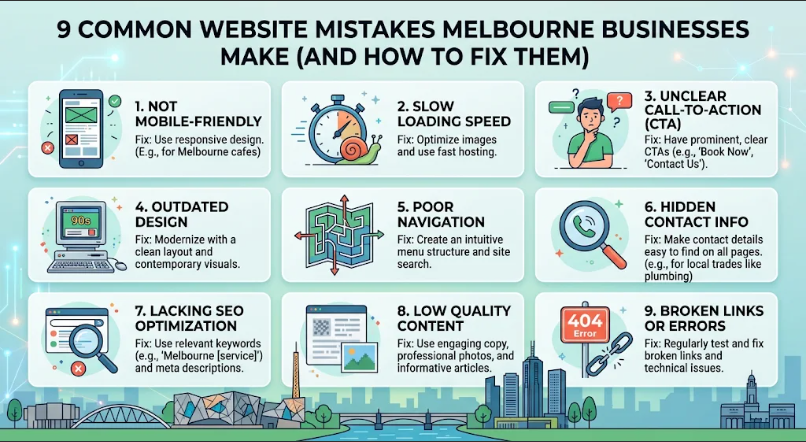
9 Common Website Mistakes Melbourne Businesses Make (And How to Fix Them)
Your website works for you around the clock, so a few tweaks can go a long way. After years of web design in Melbourne, we’ve noticed that the same small oversights come up again and again, and every one of them has a simple fix. Here are nine to look out for, with practical ideas you can put to work this month. Even one or two changes can bring in more enquiries, so grab a coffee and have a look at your own site as you read.
Getting the Foundations Right
A strong foundation makes everything else on your site work better. These first three fixes help visitors arrive, stay and find their way around.
1. Slow Load Times
People notice speed in a heartbeat, especially on a phone between meetings. Large images and extra plugins are the usual culprits. Compress your photos, use modern formats like WebP and choose good hosting with servers in Australia. Free tools like Google PageSpeed Insights show you exactly where to improve. Once your pages open quickly, visitors stay longer, and Google tends to notice too.
2. A Site That Isn’t Built for Mobile First
Most Australians browse on their phones, so the small-screen version of your site deserves top billing. Check yours on your own phone. Is the text easy to read without zooming? Are the buttons big enough to tap? Ask your developer for a mobile-first design, with simple menus, generous spacing and a tap-to-call button. A site that feels easy on a phone turns passing visitors into customers.
3. Confusing Navigation
Visitors love to find things quickly. Keep your main menu short, with five to seven clear options like Services, About, Reviews and Contact. Use plain words rather than clever names, and make sure your logo links back to the homepage. A good test is to ask a friend to find your prices or opening hours. If they get there in a few seconds, you’re in great shape.
Helping Customers Take Action
Once people are on your site, the next step is making it easy for them to get in touch. These three fixes guide visitors towards enquiring or buying.
4. Missing or Vague Calls to Action
Every page should invite a next step. “Get my free quote” tells people exactly what happens, while “Click here” leaves them guessing. Pick one main action for each page and make that button stand out with a contrasting colour. Repeat it near the top and again after your main sections. Clear buttons are one of the simplest ways to lift enquiries.
5. Content That Needs a Refresh
Fresh content shows customers and Google that your business is active. Take a look at your services pages, prices, team photos and blog. Update anything that has changed, add recent projects and publish a new post when you have news to share. Write the way you’d talk to a customer, in short, friendly sentences. Even a small refresh each quarter keeps your site feeling alive.
6. Contact Details That Are Hard to Find
Make it easy for people to reach you. Put your phone number, email and address in the header or footer of every page, and keep a full contact page with a map and opening hours. A clickable phone number and a short enquiry form work especially well. If you’re a local business, add the suburbs you serve. The easier you are to contact, the more calls you’ll receive.
Building Trust and Visibility
Great businesses deserve to be found and trusted. The final three fixes help new customers feel confident choosing you.
7. Not Showing Off Your Reviews
Happy customers are your best advertisement, and your website is the perfect place to share their words. Add real testimonials with first names and suburbs, link to your Google reviews and display any awards or memberships. Photos of finished work and your team add a lovely personal touch. A few genuine reviews can do more to win someone over than a page of sales copy.
8. Overlooking Local SEO Basics
Local search is a huge opportunity for Melbourne businesses. Set up your Google Business Profile, use the same name, address and phone number everywhere online, and create pages for each suburb or service you offer. Add clear page titles and descriptions that mention your area, such as “Plumber in Brunswick”. These simple steps help nearby customers find you when they search.
9. Skipping Analytics, Security and Regular Updates
Your website is easier to look after when you know how it’s performing. Set up Google Analytics and Search Console, both free, to see which pages people love and what brings them in. Make sure your site has an SSL certificate (the padlock in the address bar), and keep your platform, themes and plugins up to date. Regular backups give you extra peace of mind. A few minutes each month keeps everything running smoothly.
Conclusion
Every website can improve, and small changes often bring the biggest wins. Start with speed, mobile comfort and clear navigation, then add strong calls to action, fresh content, visible reviews and solid local SEO. If you’d like a hand with any of it, our team at Make My Website would love to take a look at your site and help you make it work harder for your business.